Trains on watchOS
When I was working as a train attendant at SJ, we used a couple of android apps for passenger and train information. For the timetable and current status/position of your train, we used Trappen, an app actually originally developed in the early 2010s by a former train driver. The app aggregated information about the train's position, next stop and other information from the rail traffic controller at Trafikverket (the track infrastructure owner).
Front and center on the main screen of that app was the current position of your train and the ominous counter representing the deviation from our timetable. Delays where displayed in minutes as a negative number and if you had passengers with tight connections at the next station, refreshing that page over and over again (and hoping we catched some minues) became a knee-jerk reaction.
PSA: If you ever want to become a train attendant, never ever say that a journey is “going well”. You WILL jinx it. I once had a trainee om my train and when we where some 20 minutes from our final stop Stockholm Central, he said how well the trip had gone, and low and behold a few minutes later we got stuck in a point failure. :)
Why not put it on the watch?
I have an Apple Watch that I think can be made to do more than just showing the time, after all it is a small computer with all these specs. Creating an app for the watch to display a train's status would be a fun first adventure in the world of Swift/SwiftUI and watchOS development.
Apple's announcement of Live Activities sounded like a promising delivery system for some live train data, but as I will explain further down sometimes it is like swimming upstream when it comes to development in the Apple environment. So I settled to make a standalone watchOS app, that because of some constraints in the way apps on the watch can run is not optimal but with some adjustment fully usable.
And with just a glans on the wrist one can see if the train is behind schedule, when the train is estimated to arrive at the next stop, and what track that will be on. For those trains that broadcast their speed, the app also displays the current speed in km/h.
First step first, get the data
But before I started coding the app I needed to know if it even was possible to get the train data needed to do what I wanted. Both Trafikverket and some train operators have web-based dashboard where you can enter a train's service number and get information about it. But that information was a couple of minutes outdated, only contained some basic information and would be a pain to parse.
I knew that not all traffic-related data was publicly available to "ordinary people", when I was working onboard we got a lot more information about what was actually happening from the train traffic controller compared to the public announcement of a simple "signal fault". But fortunately Trafikverket provides a quite extensive open API to get real-time data. For all non-freight trains, you can get current position (gnss if available), speed (if available), all stops on the journey, arrival/departure time at stops, if the train is delayed/early, track at stops and a lot of auxiliary information, like if the train have a restaurant car. All this data is available from Trafikverket's open API.
API request
To make a request to the API you need to create an account and get a authentication key. You do a HTTP POST request with a xml body to either https://api.trafikinfo.trafikverket.se/v2/data.xml or https://api.trafikinfo.trafikverket.se/v2/data.json depending on if you want the response as xml or json.
In this example I'm querying the status of SJ high-speed train service number 545 for today (2026-04-05). To get current position, if the train left or arrived and the time it should have, the following request is made:
$ curl https://api.trafikinfo.trafikverket.se/v2/data.json -H "Content-Type: text/xml" --data \
'<REQUEST>
    <LOGIN authenticationkey="your-bearer-key" />
    <QUERY objecttype="TrainAnnouncement" orderby="AdvertisedTimeAtLocation desc" schemaversion="1.9" limit="1">
        <FILTER>
            <EQ name="AdvertisedTrainIdent" value="545" />
            <EQ name="DepartureDateOTN" value="2026-04-05" />
            <EXISTS name="TimeAtLocation" value="true" />
        </FILTER>
        <INCLUDE>AdvertisedTimeAtLocation</INCLUDE>
        <INCLUDE>TimeAtLocation</INCLUDE>
        <INCLUDE>LocationSignature</INCLUDE>
        <INCLUDE>ActivityType</INCLUDE>
    </QUERY>
</REQUEST>'
That will give us the following json response:
{
	"RESPONSE": {
		"RESULT": [
			{
				"TrainAnnouncement": [
					{
						"ActivityType": "Avgang",
						"AdvertisedTimeAtLocation": "2026-04-05T18:52:00.000+02:00",
						"LocationSignature": "Gn",
						"TimeAtLocation": "2026-04-05T18:50:00.000+02:00"
					}
				]
			}
		]
	}
}The response gives us the current position "LocationSignature": "Gn". Gn is the signature for Gnesta (we can query the api for the full name). We see that the train departed Gnesta "ActivityType": "Avgang", and by comparing AdvertisedTimeAtLocation and TimeAtLocation we can calculate that the train 545 departed Gnesta 2 minutes before schedule.
So to get the current position, the next stop, current speed and get the names of the locations we need to do these four queries to the api:
Current position
<QUERY objecttype="TrainAnnouncement" orderby="AdvertisedTimeAtLocation desc"
       schemaversion="1.9" limit="1">
    <FILTER>
        <EQ name="AdvertisedTrainIdent" value="train_number" />
        <EQ name="DepartureDateOTN" value="yyyy-mm-dd" />
        <EXISTS name="TimeAtLocation" value="true" />
    </FILTER>
    <INCLUDE>AdvertisedTimeAtLocation</INCLUDE>
    <INCLUDE>TimeAtLocation</INCLUDE>
    <INCLUDE>LocationSignature</INCLUDE>
    <INCLUDE>ActivityType</INCLUDE>
</QUERY>
Next stop
<QUERY objecttype="TrainAnnouncement"
       orderby="AdvertisedTimeAtLocation asc" schemaversion="1.9" limit="1">
	<FILTER>
		<IN name="LocationSignature"
            value="$function.TrainAnnouncement_v1.GetLocationsForTrain(train_number, yyyy-mm-dd)" />
		<EQ name="AdvertisedTrainIdent" value="train_number" />
		<EQ name="DepartureDateOTN" value="yyyy-mm-dd" />
		<EQ name="Canceled" value="false" />
		<EQ name="Advertised" value="true" />
		<EXISTS name="TimeAtLocation" value="false" />
	</FILTER>
	<INCLUDE>AdvertisedTimeAtLocation</INCLUDE>
	<INCLUDE>TimeAtLocation</INCLUDE>
	<INCLUDE>EstimatedTimeAtLocation</INCLUDE>
	<INCLUDE>EstimatedTimeIsPreliminary</INCLUDE>
	<INCLUDE>LocationSignature</INCLUDE>
	<INCLUDE>ActivityType</INCLUDE>
	<INCLUDE>TrackAtLocation</INCLUDE>
</QUERY>
Current speed
<QUERY objecttype="TrainPosition" namespace="järnväg.trafikinfo"
       orderby="TimeStamp desc" schemaversion="1.1" limit="1">
    <FILTER>
        <EQ name="Train.AdvertisedTrainNumber" value="train_number" />
        <EQ name="Train.JourneyPlanDepartureDate" value="yyyy-mm-dd" />
    </FILTER>
    <INCLUDE>Speed</INCLUDE>
</QUERY>
Location name
<QUERY objecttype="TrainStation" namespace="rail.infrastructure" schemaversion="1.5">
	<FILTER>
		<EQ name="LocationSignature" value="cst" />
	</FILTER>
	<INCLUDE>AdvertisedShortLocationName</INCLUDE>
</QUERY>
Gallery
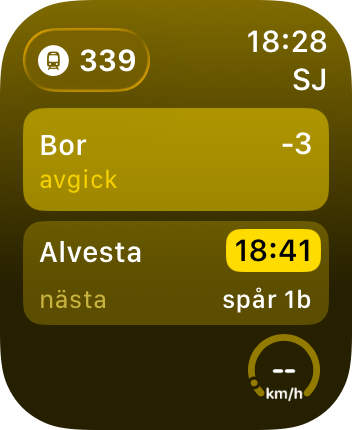
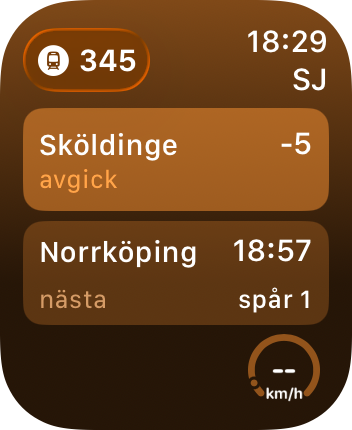
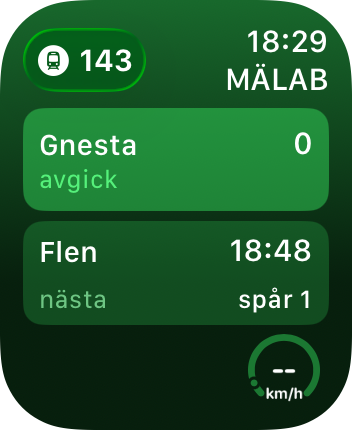
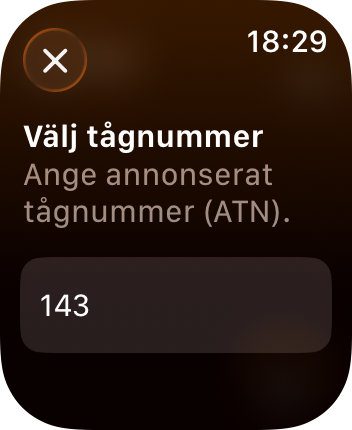
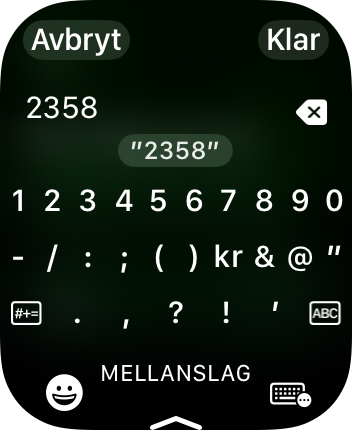
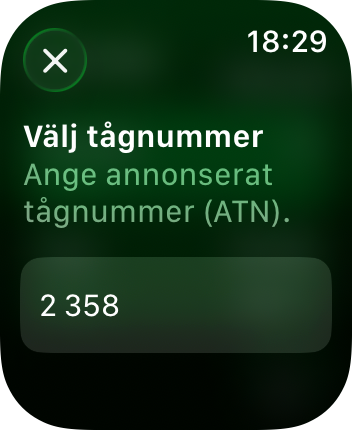
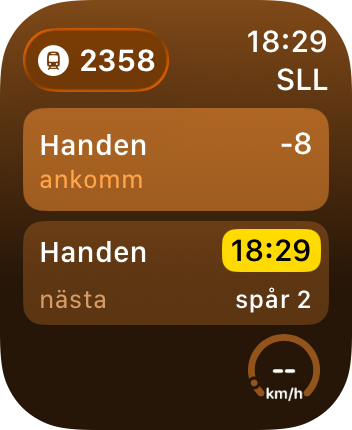
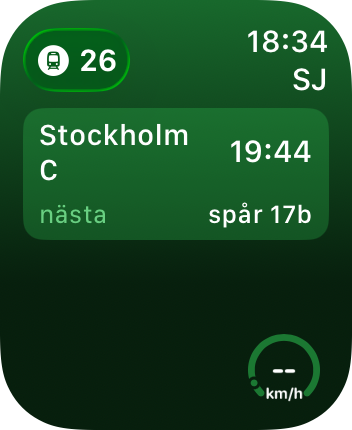
This a image gallery of the current status of the app, showing different trains and how the app responds and displays the data. Currently the code to get the speed of a train that broadcasts it is not wired up. The background colour changes deepening of how late a train is, using the same colour coding as the interactive map at 1409.se:
- >= 15 minutes late is red
- >= 5 minutes late is orange
- >= 2 minutes late is yellow
- on time is green
- >= 5 minutes early is blue
If the train get a new preliminary arrival time and/or track at the next station, the background around it turn yellow (as in the first image). If the preliminary arrival time is revoked, the background turns off.
Next up... Swift
In a short while I will continue this post and follow up whith my adventures in wrangling with Xcode and writing a Swift app for the first time.